|
|
| |
|
cms659 |
 General Member General Member |

|
 United States of America
 |
| |
| Joined: 3/18/2007 |
|
B-Day: 6/14/1959 (66) |
|
Posts: 45 |
| |
|
| |
| Posted: Monday, March 26, 2007 at
9:45:32 PM |
IP Logged |
|
First, hi everyone. Im Chuck and new to this website. Im really enjoying seeing what others have to say and what not.
Next thing is, Im in the process of building a course with Course Architect for 2006 mainly to play on 2007 (the jpg of one of the holes on the course - which I am actually having trouble with - is included here). All of my holes have elevated tee boxes which have not been a problem with the exception of this one hole. As you see when you open the jpg, this is a hole with both an elevated island tee box and an elevated island green. In the picture, everything appears to be correct, however, when you play the course, the tee boxes are flat as a pancake, even with the rest of the surface. Ive tried a lot of different things to make them appear correctly when I test the course by playing it to no avail. The island the tee boxes are on sits 10 feet above the water surface. This happens whether I am playing in TW2006 or 2007. Any suggestions?
Thank you,
Chuck |
| |
|
|
| |
|
cms659 Signature |
|
Chuck
CDT Staff |
|
| |
|
|
| |
|


|
| |
|
Gunpower61 |
 Site Admin Site Admin |
|
|
 Belgium
 |
| |
| Joined: 12/9/2004 |
|
B-Day: 4/30/1961 (64) |
|
Posts: 4,246 |
| |
|
| |
| Posted: Tuesday, March 27, 2007 at
2:21:21 PM |
IP Logged |
|
| edited by: Gunpower61 on
Tuesday, March 27, 2007 at
2:47:00 PM
|
| |
Hi, not sure this will help you, but some great tutorials on link below:
On link below you can find EA sports Coursearchitect.pdf file:
|
| |
| |
|
|
| |
|
|
|
| |
|
cms659 |
|
General Member |
|
|
|
United States of America |
| |
| Joined: 3/18/2007 |
|
B-Day: 6/14/1959 (66) |
|
Posts: 45 |
| |
|
| |
| Posted: Tuesday, March 27, 2007 at
5:57:11 PM |
IP Logged |
|
Thanks for replying. I have the architect pdf and those Smiling Goats tutorials. They have been extremely helpful in my quest to get this course finished. However, to throw another curveball into things, oddly enough, something I hadnt done previously, has me even more perplexed. When I play my course in practice mode and go to that hole, the tee box appears as it should. It is only when I actually play the course for real via the custom setting OR online with a friend of mine who is helping me test the course that the look of the tees on that hole do not show up properly.
At any rate, thanks again for the reply.
Chuck |
| |
| |
|
cms659 Signature |
|
Chuck
CDT Staff |
|
| |
|
|
| |
|
|
|
| |
|
Hyno Designs |
|
General Member |

|
|
United States of America |
| |
| Joined: 10/24/2004 |
|
B-Day: 10/30/1976 (49) |
|
Posts: 752 |
| |
|
| |
| Posted: Tuesday, March 27, 2007 at
6:32:42 PM |
IP Logged |
|
| edited by: Hyno Designs on
Tuesday, March 27, 2007 at
6:36:00 PM
|
| |
Ok, from looking at the picture, you need to do a few things. The 1st thing is you are going have to destroy the work you did in the water. Here is what you need to do. Flatten the water 100% go 20 feet out, than make sure it all blends in to the course. But dont smooth it out in to the water, leave that flat. You need to pick the height you want the water at also. Next with the island green, you need to reshape it, keep the green the same, but create a path toward green. Basically what you do, is reshape the water texture around the green, then shape it in to a pathway to the dry land. Trust me on this, it is a lot easier to work with. If you want a tee box that sits in the water, do the same with the shaping. You also need to optimize stuff. If you have no idea what the heck I am talking about, send me the TCA file, Ill fixed this, you can see what I do on the shaping and go from there.......
Working with water, you need to know, it has to be 100% flat. To do woodplanks, is advanced, and to hard for me to explain....It takes forever, it easy to just use a texture for it.....
One more thing on the planting, use different trees and different heights, you need to think like a landscaper....... |
| |
| |
|
|
| |
|
|
|
| |
|
big9324 |
|
General Member |
|
|
|
United States of America |
| |
| Joined: 9/9/2003 |
|
B-Day: 11/9/1970 (55) |
|
Posts: 104 |
| |
|
| |
| Posted: Thursday, March 29, 2007 at
1:14:12 AM |
IP Logged |
|
|
"Ok, from looking at the picture, you need to do a few things. The 1st thing is you are going have to destroy the work you did in the water. Here is what you need to do. Flatten the water 100% go 20 feet out, than make sure it all blends in to the course. But dont smooth it out in to the water, leave that flat. You need to pick the height you want the water at also. Next with the island green, you need to reshape it, keep the green the same, but create a path toward green. Basically what you do, is reshape the water texture around the green, then shape it in to a pathway to the dry land. Trust me on this, it is a lot easier to work with. If you want a tee box that sits in the water, do the same with the shaping. You also need to optimize stuff. If you have no idea what the heck I am talking about, send me the TCA file, Ill fixed this, you can see what I do on the shaping and go from there.......
Working with water, you need to know, it has to be 100% flat. To do woodplanks, is advanced, and to hard for me to explain....It takes forever, it easy to just use a texture for it.....
One more thing on the planting, use different trees and different heights, you need to think like a landscaper......." |
That’s great advice if he’s having problems with the water reflections, land shaping, or planting. from what I saw it looks like he was having a tee box issue.
If it is a tee box issue and you are seeing a big difference from offline play to online play, it could be the tee settings. Offline uses tourny tees and online only goes to pro for the furthest tee settings. This will make a huge difference in what you see, obviously.
There are many ways to do this so you play the same tee’s both offline and on. Here is how I do it. If you notice in the attached pic, I uncheck the tourny tee box. That means I only set 4 tee spots in the CA. I set my hole distances based on the pro tee being the furthest back.
Now, when I play offline, the tourny tee and the pro tee will be the same. The game just reads the pro tee, or the furthest tee back, as the tourny tee. Online the game uses the pro tee as the furthest back so Im getting the same looks as offline. Try posting a pic of the course with the shot paths like I have mine. It will be easy to tell if this is the issue.
If its not the answer then there are many other little things to try until its fixed. The fun part about learning the CA is doing the trial and error yourself. I wouldn’t send the TCA to anyone unless you’ve done everything yourself and still cant get it.
The advice given, that I quoted above, is good advice but its not problem specific. At some point you will need to address those issues but if you go off and start messing with all those diff things, thinking they will be the fix to your problem, you more than likely will end up confused and frustrated. Stay focused on the single issue at hand, then move on.
Good luck and keep posting if you cant get it or have questions. Any designer with experience can attest to the fact that especially with this program, there are no dumb questions!!
big |
| |
|
|
| |
|
|
| |
|
|
|
| |
|
Hyno Designs |
|
General Member |
|
|
|
United States of America |
| |
| Joined: 10/24/2004 |
|
B-Day: 10/30/1976 (49) |
|
Posts: 752 |
| |
|
| |
| Posted: Thursday, March 29, 2007 at
2:19:31 AM |
IP Logged |
|
|
"[QUOTE=
If its not the answer then there are many other little things to try until its fixed. The fun part about learning the CA is doing the trial and error yourself. I wouldn’t send the TCA to anyone unless you’ve done everything yourself and still cant get it.
" |
If you look at the picture in detail, and u see the water level higher than the land on the left. Than look all the way down and u see water rips / tears in to the land area. That is for sure something that more than likely needs to be addressed.
this is a hole with both an elevated island tee box and an elevated island green. In the picture, everything appears to be correct, however, when you play the course, the tee boxes are flat as a pancake, even with the rest of the surface.
Big, from what I am reading here it sounds like. That the work in the CA, which has elevations when compiled it is 100% FLAT....Than when he plays in a different mode it is not flat. Now 2 many points in an area can cause texture to go clear or black, which may look flat...
When I play my course in practice mode and go to that hole, the tee box appears as it should. It is only when I actually play the course for real via the custom setting OR online with a friend of mine who is helping me test the course that the look of the tees on that hole do not show up properly. - now this sounds like what big explained above.....You are playing different tee boxes.... |
| |
| |
|
|
| |
|
|
|
| |
|
big9324 |
|
General Member |
|
|
|
United States of America |
| |
| Joined: 9/9/2003 |
|
B-Day: 11/9/1970 (55) |
|
Posts: 104 |
| |
|
| |
| Posted: Thursday, March 29, 2007 at
4:51:04 AM |
IP Logged |
|
|
"
|
"[QUOTE=
If its not the answer then there are many other little things to try until its fixed. The fun part about learning the CA is doing the trial and error yourself. I wouldn’t send the TCA to anyone unless you’ve done everything yourself and still cant get it.
" |
If you look at the picture in detail, and u see the water level higher than the land on the left. Than look all the way down and u see water rips / tears in to the land area. That is for sure something that more than likely needs to be addressed.
this is a hole with both an elevated island tee box and an elevated island green. In the picture, everything appears to be correct, however, when you play the course, the tee boxes are flat as a pancake, even with the rest of the surface.
Big, from what I am reading here it sounds like. That the work in the CA, which has elevations when compiled it is 100% FLAT....Than when he plays in a different mode it is not flat. Now 2 many points in an area can cause texture to go clear or black, which may look flat...
When I play my course in practice mode and go to that hole, the tee box appears as it should. It is only when I actually play the course for real via the custom setting OR online with a friend of mine who is helping me test the course that the look of the tees on that hole do not show up properly. - now this sounds like what big explained above.....You are playing different tee boxes....
" |
Looking at the picture in detail absolutly shows the many other differences he has, but those things wernt his question. I agree that he may want to look at fixing a few of those things, but then again, maybe he doesnt. Its not my place to tell him how he wants his course to look.
He asked a question about the tees so lets fix the tees. If he wants to do other stuff after that, then he just has to ask.
The biggest issue rt now is the pic provided doesnt show what needs to be seen. It does show 5 elevated tee boxes. Thats a tall tell sign he has tourny tees set further back than the pro tees. Seeing as how he says he doesnt see the problem on other holes means either a) his tee pins are somehow set diff on this hole, or b) he may have to many points in that area, or c) 1 of about 50 other things.
W/O a better pic of the problem, ie shot paths showing and point count indicator showing, its just a guessing game. If his points are 2 hi and the texture is clear or black, then he would immediatly notice the transparent texture and I assume mention it as part of his problem. The deal is, if its to hi, then it doesnt matter where he plays the course, the area will be bad.
Practice mode plays with all tourny settings off, such as gallery, ect. Is there gallery in that area that may cause rendering issues when in custom mode or online? I mean I could keep going in circles with this forever. If he is able to put together some better pics then things get easier. Until then, Im not going to speculate any more than the couple of obvious things already stated. ) |
| |
| |
|
|
| |
|
|
|
| |
|
Hyno Designs |
|
General Member |
|
|
|
United States of America |
| |
| Joined: 10/24/2004 |
|
B-Day: 10/30/1976 (49) |
|
Posts: 752 |
| |
|
| |
| Posted: Thursday, March 29, 2007 at
11:32:31 AM |
IP Logged |
|
| edited by: Hyno Designs on
Thursday, March 29, 2007 at
10:53:00 PM
BIG WINS !!!!! |
| |
| It seems like I cant win here, I give up. Big9324 you win...... Your post below was funny though...... |
| |
| |
|
|
| |
|
|
|
| |
|
big9324 |
|
General Member |
|
|
|
United States of America |
| |
| Joined: 9/9/2003 |
|
B-Day: 11/9/1970 (55) |
|
Posts: 104 |
| |
|
| |
| Posted: Thursday, March 29, 2007 at
3:15:43 PM |
IP Logged |
|
| Hell while your at it, throw in a few pics of the family, your car, house and any holidays you have handy!! :) |
| |
| |
|
|
| |
|
|
|
| |
|
cms659 |
|
General Member |
|
|
|
United States of America |
| |
| Joined: 3/18/2007 |
|
B-Day: 6/14/1959 (66) |
|
Posts: 45 |
| |
|
| |
| Posted: Friday, March 30, 2007 at
5:47:53 PM |
IP Logged |
|
|
"
|
"
|
"[QUOTE=
If its not the answer then there are many other little things to try until its fixed. The fun part about learning the CA is doing the trial and error yourself. I wouldn’t send the TCA to anyone unless you’ve done everything yourself and still cant get it.
" |
If you look at the picture in detail, and u see the water level higher than the land on the left. Than look all the way down and u see water rips / tears in to the land area. That is for sure something that more than likely needs to be addressed.
this is a hole with both an elevated island tee box and an elevated island green. In the picture, everything appears to be correct, however, when you play the course, the tee boxes are flat as a pancake, even with the rest of the surface.
Big, from what I am reading here it sounds like. That the work in the CA, which has elevations when compiled it is 100% FLAT....Than when he plays in a different mode it is not flat. Now 2 many points in an area can cause texture to go clear or black, which may look flat...
When I play my course in practice mode and go to that hole, the tee box appears as it should. It is only when I actually play the course for real via the custom setting OR online with a friend of mine who is helping me test the course that the look of the tees on that hole do not show up properly. - now this sounds like what big explained above.....You are playing different tee boxes....
" |
Looking at the picture in detail absolutly shows the many other differences he has, but those things wernt his question. I agree that he may want to look at fixing a few of those things, but then again, maybe he doesnt. Its not my place to tell him how he wants his course to look.
He asked a question about the tees so lets fix the tees. If he wants to do other stuff after that, then he just has to ask.
The biggest issue rt now is the pic provided doesnt show what needs to be seen. It does show 5 elevated tee boxes. Thats a tall tell sign he has tourny tees set further back than the pro tees. Seeing as how he says he doesnt see the problem on other holes means either a) his tee pins are somehow set diff on this hole, or b) he may have to many points in that area, or c) 1 of about 50 other things.
W/O a better pic of the problem, ie shot paths showing and point count indicator showing, its just a guessing game. If his points are 2 hi and the texture is clear or black, then he would immediatly notice the transparent texture and I assume mention it as part of his problem. The deal is, if its to hi, then it doesnt matter where he plays the course, the area will be bad.
Practice mode plays with all tourny settings off, such as gallery, ect. Is there gallery in that area that may cause rendering issues when in custom mode or online? I mean I could keep going in circles with this forever. If he is able to put together some better pics then things get easier. Until then, Im not going to speculate any more than the couple of obvious things already stated. )" |
OK. Here is the deal. I am aware of some of the other things that need attention. I do appreciate all the responses. I must not have made my problem with this one tee box clear enough though. If you look at my original picture, as big9324 has correctly stated, the tee boxes (all 5 of them) appear as they should. While the Tourney tee box is behind me (I generally play in Pro tee mode), I understand why I would not see that one at all, let alone properly. The problem is, the tee box I am standing on as well as the other 3 tee boxes I can see off to the side and in front of me, play and appear flat (i.e. - unelevated as they were built and appear in the picture) and even with the surface they were built on.
Again, thanks all for the responses.
Chuck |
| |
| |
|
cms659 Signature |
|
Chuck
CDT Staff |
|
| |
|
|
| |
|
|
|
| |
|
big9324 |
|
General Member |
|
|
|
United States of America |
| |
| Joined: 9/9/2003 |
|
B-Day: 11/9/1970 (55) |
|
Posts: 104 |
| |
|
| |
| Posted: Saturday, March 31, 2007 at
2:17:13 AM |
IP Logged |
|
It could very well just be a werid glitch caused by a high point count for that area. Not so much a texture poly count issue as much as an added obj or gallery thats causing the issue. Ive seen some crazy things when a certain spot gets past the limit, but not quite past enough to render transparent textures.
Im just throwin out a few guesses here but hopefully one hits home.
You say its ok when you play in practice mode, which is the lowest settings usage of all the play modes, but not when your online or offline in a custom settings game. Do you have gallery placed on the course and specifically in that area? If so you want to try and move or delete them.
If this isnt it then I really need to have a better visual of the problem.
Try and post one or 2 more pics of the area, showing what I said above, if you would.
Thanks,
big |
| |
| |
|
|
| |
|
|
|
| |
|
cms659 |
|
General Member |
|
|
|
United States of America |
| |
| Joined: 3/18/2007 |
|
B-Day: 6/14/1959 (66) |
|
Posts: 45 |
| |
|
| |
| Posted: Saturday, March 31, 2007 at
6:52:55 PM |
IP Logged |
|
|
"It could very well just be a werid glitch caused by a high point count for that area. Not so much a texture poly count issue as much as an added obj or gallery thats causing the issue. Ive seen some crazy things when a certain spot gets past the limit, but not quite past enough to render transparent textures.
Im just throwin out a few guesses here but hopefully one hits home.
You say its ok when you play in practice mode, which is the lowest settings usage of all the play modes, but not when your online or offline in a custom settings game. Do you have gallery placed on the course and specifically in that area? If so you want to try and move or delete them.
If this isnt it then I really need to have a better visual of the problem.
Try and post one or 2 more pics of the area, showing what I said above, if you would.
Thanks,
big" |
I dont have any galleries on the course at all as of yet. But, Ive determined that my problem WAS gremlins. That is the only explanation I have (LOL). I was working on some other areas of the course yesterday, and lo and behold, the tee box on that hole appears properly in both Custom mode and also worked for my friend when we played it online. I have been putting that area of the course on the shelf and working on getting the rest of the course done so Ive done nothing with that tee and all of a sudden its working properly in all modes.
Thanks again all for all the responses. For the record, I still have no idea why it didnt work in the first place and have no idea why its working now.
Chuck |
| |
| |
|
cms659 Signature |
|
Chuck
CDT Staff |
|
| |
|
|
| |
|
|
|
| |
|
big9324 |
|
General Member |
|
|
|
United States of America |
| |
| Joined: 9/9/2003 |
|
B-Day: 11/9/1970 (55) |
|
Posts: 104 |
| |
|
| |
| Posted: Saturday, March 31, 2007 at
7:22:53 PM |
IP Logged |
|
| edited by: big9324 on
Saturday, March 31, 2007 at
7:24:00 PM
|
| |
|
| "It seems like I cant win here, I give up. Big9324 you win...... Your post below was funny though......" |
Ya it was kinda funny but it was just meant to lighten up the mood a bit. I wasnt trying to rip on you or anything, theres plenty of other posts for that. ) |
| |
| |
|
|
| |
|
|
|
|

 Post Reply
 New Topic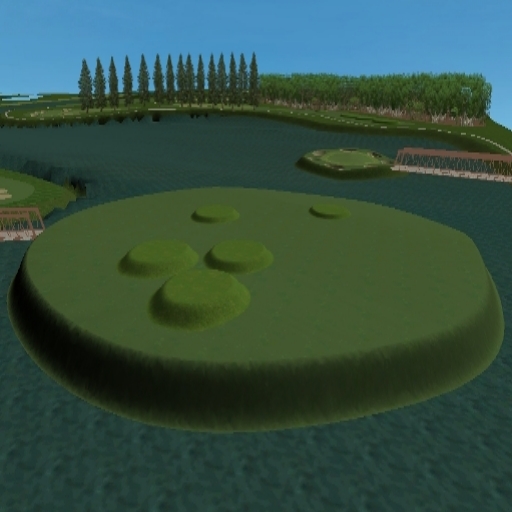
 - JPG File -